Step-by-step installation guide, FAQs, and care instructions for your MODZ® Lithium Battery
Helpful DocumentsFind everything you need to install and maintain your MODZ® Lithium Batteries
This complete, ready-to-install bundle is engineered to deliver performance, safety, and convenience right out of the box
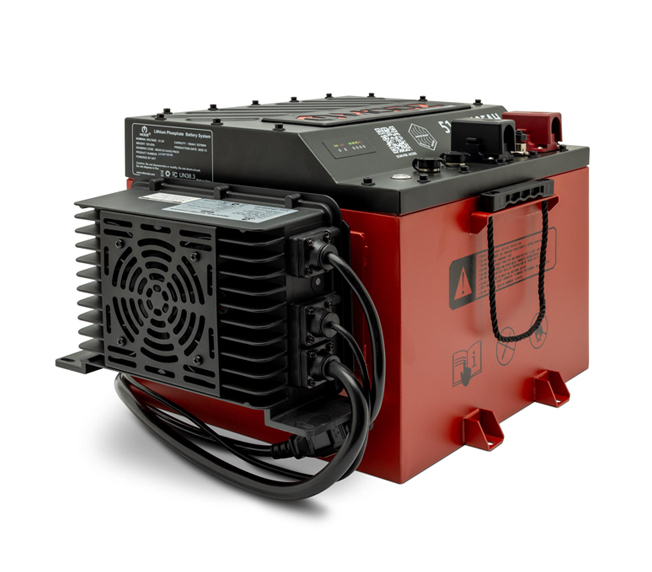
A modern, premium enclosure sets this battery apart from traditional black box designs while providing IP66-rated protection against dust and water for maximum durability in real-world conditions.
Designed for a secure, clean installation across a wide range of golf cart applications.
A purpose-built mounting system allows the charger to be securely mounted directly to the battery without drilling, creating a clean installation and optimal placement every time.
Industry-leading charging performance with faster charge times and enhanced safety you can trust.
Below are helpful documents, including installation and owner’s manuals, for your MODZ lithium battery.
Got a question? We've got answers. If you don't see your question here, feel free to contact our support team.
You can register your battery using the app or by emailing us at customerservice@ridemodz.com
Turn off the golf cart key switch and make sure the battery power switch is set to ON. Plug the charger into the cart first, then into the wall outlet. Charging will start automatically and stop once the battery is full. When finished, unplug the charger from the wall first, then disconnect it from the cart.
A 105Ah battery typically takes about 6 hours to fully charge, depending on the charger’s output and the battery’s current state of charge.
The system will shut down if the metal switch is turned off after 6 seconds or if it is powered off from the digital display by holding the button for 5 seconds. It will also power down if an over-discharge fault lasts more than 30 minutes or if the battery remains idle with no communication, charging, or discharging for more than 7 days.
To wake the battery from sleep mode, press and hold the state-of-charge meter for 3 to 5 seconds. You can also press the power button directly on the battery.
Please confirm the following: the charger’s CAN connection is connected to the battery, the battery power button is in the ON position, the battery temperature is above 32°F (0°C) or allowed time to warm via the internal heater before charging, and that scheduled charging is not enabled in the MODZ app unless the set charge time has been reached.
If you see an error code, please refer to the Owner’s Manual included with your battery or access it using the link above and follow the recommended steps for that code. If the issue continues or you need clarification, please contact our customer support team for assistance.
The MODZ battery includes a 5-year free replacement warranty. After year 5, it is covered under a limited lifetime prorated warranty based on the current MSRP at the time of claim approval. Select components, including the SOC meter, cables, solenoids, and voltage reducers, carry a 1-year warranty, while the charger is covered for 3 years. This warranty does not apply to commercial or rental use, improper installation, misuse, modification, physical damage, or operation outside published specifications. Please refer to the complete warranty statement for full terms and conditions.
MODZ® Lithium battery requires little to no maintenance compared to traditional batteries.
Ensure the battery top is clean, dry, and free of dirt and grime, and inspect the battery case for obvious signs of physical damage or warpage.
Inspect the terminals, screws, cables, and the charging and discharging power plug, these components should be clean, tight, and free of corrosion.
Fully recharge the battery once per week when the golf cart operates for over 8 hours per day. Fully recharge the battery once per month when the golf cart operates for under 8 hours per day.
Power off the battery before long-term storage. Recharge batteries every 3 months. Before using after long-term storage, fully discharge and then fully charge the battery twice to allow the BMS to properly calibrate the state of charge.
Our dedicated support team is here to assist you with any questions or concerns you may have about your MODZ® Lithium Battery.
Monday - Friday, 9am - 5pm CST